| Shortcut Keys | Action in Windows XP |
| CTRL + A | Select all the items in the active window. |
| CTRL + C | Copy the selected item. |
| CTRL + F | Displays the find all dialog box. |
| CTRL + G | Displays the Go to folder dialog box. |
| CTRL + N | Displays the New dialog box. |
| CTRL + O | Displays the Open dialog box |
| CTRL + P | Displays the Prints dialog box. |
| CTRL + S | Displays the Save dialog box. |
| CTRL + V | Paste the copied item. |
| CTRL + X | Cuts the selected item. |
| CTRL + Z | Undo the last action done. |
| CTRL + F4 | Closes the active document window. |
| CTRL while dragging an item | Copy the selected item. |
| CTRL + SHIFT with arrow keys | Highlight a block of text |
| CTRL + ESC | Display the start menu. |
| CTTRL + F6 | Opens the next document window in the active application. |
| ALT + F4 | Close the active item or window. |
| ALT + SPACE BAR | Opens the shortcut menu for the active window. |
| ALT + TAB | Switch between the open items. |
| ALT + ESC | Cycle through items in the order that they had opened. |
| F1 Key | Gives help on the active window or selected item. |
| F2 Key | Rename the selected item. |
| F3 Key | Search for a file or a folder. |
| F4 Key | Display the address bar list in My Computer or Windows Explorer |
| F5 Key | Update the active window. |
| F6 Key | Cycle through the screen elements in the window or on the desktop |
| F10 Key | Activate the menu bar in the active program. |
| Windows Logo | Display or hide the start menu. |
| Shift + F10 | Right click |
| Ctrl + Shift + Esc | Task Manager |
| Alt + Enter | View Properties for selected item |
| Windows Logo + B | Move focus to system tray icons |
| Windows Logo + Break/ Pause | Display the system properties dialog box. |
| Windows Logo + D | Display the desktop. |
| Windows Logo + M | Minimize all of the windows. |
| Windows Logo + SHIFT + M | Restore the minimized windows. |
| Windows Logo + E | Open My Computer. |
| Windows Logo + F | Search for a file or folder. |
| CTRL + Windows Logo + F | Search for computers. |
| Windows Logo + F1 | Display windows Help. |
| Windows Logo + L | Lock the Keyboard. |
| Windows Logo + R | Open the RUN Dialog box. |
| Windows Logo + U | Open Utility Manager. |
| TAB | Move forward through the options |
| SHIFT + TAB | Move backward through the options |
| CTRL + TAB | Move forward through the tabs |
| CTRL + SHIFT + TAB | Move backward through the tabs |
| ALT + Underlined Letter | Perform the corresponding commands or select the corresponding option. |
| ENTER | Perform the command for the active option or button. |
| SPACEBAR | Select or clear the checkbox if the active option is the check box. |
| F1 Key | Display Help. |
| F4 Key | Display the items in the active list. |
| Arrow Key | Select a button if the active option is a group of option buttons. |
| BACKSPACE | Opens a folder one level up if a folder is selected in the SAVE AS or OPEN dialog box. |
| END | Display the bottom of the active window. |
| HOME | Display the top of the active window. |
| NUM LOCK + ASTERISK SIGN(*) | Display all of the sub folders that are under the selected folder. |
| NUM LOCK + PLUS SIGN(+) | Display the contents of the selected folder. |
| NUM LOCK + MINUS SIGN(-) | Collapse the selected folder. |
| LEFT ARROW | Collapse the current selection if it is expanded, or select the parent folder. |
| RIGHT ARROW | Display the current selection if it is collapsed, or select the first sub folder. |
Monday, 7 March 2011
Windows Shortcut Keys

How to Disable XP VISTA shutdown
HKEY_CURRENT_USER\Software\Microsoft\Windows\CurrentVersion\Policies\Explorer Create a new DWORD value named NoClose with a data value of 1.
Exit the Registry and reboot in order for the change to take effect.
reenable normal shutdowns, delete the NoClose value.
Exit the Registry and reboot in order for the change to take effect.
reenable normal shutdowns, delete the NoClose value.
Task Manager Disabled
Click Start -> Run and type the following command exactly and press Enter
REG add HKCU\Software\Microsoft\Windows\CurrentVersion\Polices\System /v
Disable TaskMgr /t REG_DWORD /d 0 /f
Open Notepad and type,
[HKEY_CURRENT_USER\Software\Microsoft\Windows\CurrentVersion\Polices\System]
"Disable TaskMgr" = dword:00000000
and Save it to your destop "Filename.reg"
Double click that .reg file to edit the Windows Registry.
REG add HKCU\Software\Microsoft\Windows\CurrentVersion\Polices\System /v
Disable TaskMgr /t REG_DWORD /d 0 /f
Open Notepad and type,
[HKEY_CURRENT_USER\Software\Microsoft\Windows\CurrentVersion\Polices\System]
"Disable TaskMgr" = dword:00000000
and Save it to your destop "Filename.reg"
Double click that .reg file to edit the Windows Registry.
Change the Default Location for Installing Programs
HKEY_LOCAL_MACHINE\Software\Microsoft\Windows\CurrentVersion.
Look for the value named ProgramFilesDir
by default, the value will be C:\Program Files
Look for the value named ProgramFilesDir
by default, the value will be C:\Program Files
Sunday, 6 March 2011
Change the default download target for InternetExplorer
If you want to change the Default download location to some other location on your System .
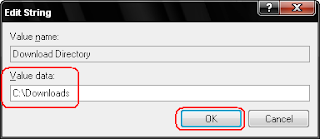
Give the path where you want to download should store....
Just do the following steps,
**Start -> Run -> type Regedit
**Navigate the following key from left pane
**HKEY_CURRENT_USER\Software\Microsoft\Internet Explorer
 Edit the "Download Directory".
Give the path where you want to download should store....
Hidden Programs In Windows XP !
1. Private Character Editor
Used for editing Fonts,etc.
**Strat -> Run -> type eudcedit
2. Dr. Watson
This is an Inbuilt Windows Repairing software
**Strat -> Run -> type drwtsn32
3. Media Player 5.1
In case of any problem in ur Media player you can use this one.
**Strat -> Run -> type mplay32
4. iExpress
Used to create Setups .You can create your own Installer !
**Strat -> Run -> type iexpress
Used for editing Fonts,etc.
**Strat -> Run -> type eudcedit
2. Dr. Watson
This is an Inbuilt Windows Repairing software
**Strat -> Run -> type drwtsn32
3. Media Player 5.1
In case of any problem in ur Media player you can use this one.
**Strat -> Run -> type mplay32
4. iExpress
Used to create Setups .You can create your own Installer !
**Strat -> Run -> type iexpress
Effective way of moving the files
When you want to move 100 filesfrom one location to another without replacing existing files windows XP will show the below option box.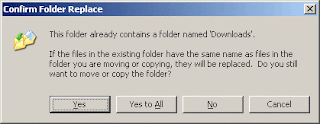
Do you want to press "No" 100 times ?
There is an easy way to solve this problem...
In that option box it's shows "Yes", "Yes to All", "No" and "Cancel".
You want enable "No to All" just hold SHIFT while clicking "No"......
Subscribe to:
Posts (Atom)