Showing posts with label Windows Tips. Show all posts

Wednesday, 23 November 2011

Make the Background of Your Icon Text Transparent on the Desktop

1. Follow the steps mentioned below,

    1. Open the Control Panel
    2. Click System
    3. Click the Advanced tab
    4. Click Settings in the Performance section
    5. Check the “Use drop shadows for icon labels on the desktop” checkbox
    6. Click OK until you close the windows

2.Right-click on Desktop - "Arrange Icons by" and ensure Lock Web
items is cleared.

3.Transparency will not work if you have web content on your desktop,
Control Panel - Display Properties - Desktop tab - Customize Desktop -
Web tab. Clear all check boxes.

4. Ensure the Wallpaper is an image file not HTML.

Tuesday, 31 May 2011

Insert HTML Code to Blogger Posting

Onetime i want to share my trick in my blog, and then i wrote some post....but when i publish it, i really shocked...the trick with consist of HTML code doesn't appear . What wrong with my post?.. I really confused. I search this problem in search engine,until i found the answer. The answer is if we want to insert a HTML code, it must be coverted the HTML characteristic with symbol/notation. Or we can use another trick. we can post a HTML code using by a more trick.
1. We can use form text area.


If we use this way, the result will be like this


2. second way to post HTML code is change a character in that code with symbol/notation.
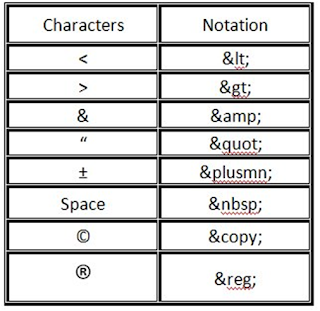
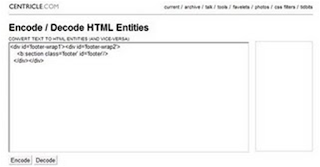
But how if the code is to much??? You can use this site to help change characteristic into notation. (http://centricle.com/tools/html-entities/). The way is so simple. Put your code and then click uncode.



3.Third way, we can use image software (paint, photoshop, or another else).
For me i usually used "PAINT", it so simple. For the first we write that code in Word, excel, or another relevant software, and then we change to image file. How to make it to be image file? just hit "ALT + PrtScSysRq" and paste in "PAINT" software. And then crop which area do you want. Save the file, and then upload.

Add zooming effect to images on your website

You must have wondered, how to add zooming effect to an image.
Its pretty simple to do....

A simple attribute of "img" tag has the capbility of doing it


<img src"https://blogger.googleusercontent.com/img/b/R29vZ2xl/AVvXsEgAFg5IG7gT11yiwP469Msas4tuIiFjOR32-qaVJtAGFbK-b9MnTscivxHJQO_Is8X7dxGlR6tbixMs9fZujvDSLtPF8DTtiOz3upVYmhFPjzusLs6sC0-pC9-d09fKhZhWsRy3dGJjdiDW/s1600/David+Luiz+Chelsea+nani+Man+Utd.jpg" onmousedown="this.height=450;this.width=600"
onmouseup="this.height=150;this.width=200" width=200 height=150 >

Friday, 1 April 2011

Shutdown Your PC in less than 5 sec


Press CTRL+ALT+DELETE or CTRL+SHIFT+ESC
Open TASK MANAGER
goto SHUT DOWN tab in Menu Bar
Press CTRL and click TURN OFF.....
computer will Shutdown immediately

Try it !!!!!

Monday, 28 March 2011

How To Watch A Movie On Your Desktop

1: Play a movie in almost any movie player.
2: Take a screenshot of it anywhere in the movie.
3:Then paste it into paint.
4: Save it as a .bmp file.
5: Now set it as your desktop background and watch the movie

Disable and Delete thumbs.db file from Folders

Open Any Folder
Go to Tools Menu -> Folder Options
Go to “View” tab
In the section “Files And Folders” Click on “DO NOT CACHE THUMBNAILS”

Using Pen Drive As a Memory(RAM)

My Computer -> Right Click -> Propertises -> Advanced Performance -> Settings ->Advanced Virtual Memory -> Change Select the Pen Drive -> Set -> Ok. Done.

Wednesday, 23 March 2011

Let Users Install Software Without Giving Them Administrator Rights

I recently discovered a new way to remotely install software. When users require a program to be installed on their computers, they download the software to their desktops. I then use Sysinternals’ PsExec utility (http://www.sysinternals.com/utilities/psexec.html) to remotely start the execution of the program, but I start the program interactively so that the user who is logged on to the target computer can complete the installation.

This approach is advantageous because you don’t need to give Administrator privileges to users who need to install software on their computers. When you run PsExec without a username and password, the remote process runs under the same account from which you execute PsExec (in this case, the Administrator account). Because the remote process is impersonating that account, the user won’t have access to network resources on the remote system. (When you specify a username and password, the remote process executes in the specified account and will have access to any network resources that the account has access to.) Using PsExec is handier than using the built-in RunAs command because you don’t need to be physically sitting at a user’s computer.

To use PsExec to remotely install software, you need to start the installer.exe program with the following command:
Psexec -i \\targetcomputer
\\targetcomputer\c$\
documents and settings\
username\desktop\installer.exe
The -i option starts installer.exe interactively for the user currently logged on to the machine specified by targetcomputer.

Remove or Rename the Recycle Bin from the Desktop

Delete Recycle Bin:
HKEY_LOCAL_MACHINE/SOFTWARE/ Microsoft/ Windows/CurrentVersion/explorer/ Desktop/NameSpace
• Then search for the string value "Recyclebin".
• Click on the "Recycle Bin" string in the right hand pane.
• Hit Del, click OK.

Rename Recycle Bin:
• HKEY_CLASSES_ROOT/CLSID/ {645FF040-5081-101B-9F08-00AA002F954E}
• It is very difficult to find the code, right?
No problem, u just copy the code and click to select edit>find; from Menu bar and past to findand by right click on "Recycle Bin"and select modify option for change the name to whatever you want (don't type any quotes).
Eg:- find this code - 645FF040-5081-101B-9F08-00AA002F954E
At last restart the computer..

How to make your Desktop Icons Name Transparent

My Computer -> Propertise -> Advanced ->
"Performance" -> Settings -> Visual Effects
select the Check box "Use drop shadows for icon labels on the Desktop"
Click OK.

Tuesday, 22 March 2011

Restore Previously Open Folders After Shutdown

First click on Start button then go to Control Panel\Appearance and Themes\Folder Options. or Tools\Folder Options
A small windows dialog box will appear with the title “Folder options”, click on View tab.
Under the Advanced setting , scroll down to bottom and click the “Restore previous folder windows at logon” option and then click Ok button to save sitting.
Now when you log off, restart or shutdown, your computer will automatically open the previously opened folders from the same location as before.

Improve Windows Start Up Speed!

Trick to improve your Start Up speed just follow these simple steps
Press & hold Shift key While Windows is being Loaded (before Desktop Comes)
Then other programs will not get start.

Thursday, 10 March 2011

Install WinXP in 10 min

1)After the Copy Part is Over...
System is Rebooted as we all know In general Foramatting Procedure.
Now After Reboot The Below Image Will Appear.

2)Now As This Image APPEARS You Have to Press "Shift + F10 ".
This Will Open The command Prompt.
Now type taskmgr in it.
This will open the Task manager.
3)After The task Manager Opens Goto Processes.
And Find "Setup.exe" process and Right CLICK on It....
and set the Priority to Highest..

4)Now Just Watch the Set It will take around 9 minutes and 2 minutes for Tolerance(depends System to system).
So When you Format your PC Next Time It will Really Save Your TIME
i.e around 20 to 25 minutes.

NotePad Tips

Hide Text in NotePad
1. Open your command prompt Start–>Run and Type cmd
2. Type cd.. to move to C:\> drive or Type cd desktop to move to your desktop.
3. Type the code shown below in your command prompt
notepad filename.txt:hidden
eg:notepad ff.txt:hidden
4. Write some data and save(Ctrl+S) the file.
5. Browse to the file location and Open filename.txt
eg: ff.txt
you cannot see any data in the file.
6. To retrieve the hidden data open command prompt and type the same command.
notepad filename.txt:hidden
eg:notepad ff.txt:hidden

Notepad Secrets:
Create a log
1. Open Notepad
2. On the very first line, type in ".LOG" (without quotes) then press Enter for a new line
3. Now you can type in some text if you want, then save the file.
4. Next time when you open the file, notice its contents. Notepad automatically adds a time/date log everytime you open the file.

Text becomes unreadable
1. Open Notepad
2. On the very first line, type in "dont eat the donut" (without quotes) then save and close the file. Note: the file should have only one line of the text above.
3. Now, open the same file. You'll notice the text becomes unreadable squares. (try this with different text with the same format and length).

Tuesday, 8 March 2011

Simple tricks in PC

Go to Run command and type ... See what it opens
Type 2 Dots .. See what it opens
type 1 Dot . See what it opens :lmao:

Open Microsoft Word
Put this - = rand(200,99) then Press enter


1. Right click on your desktop
2. Then in NEW click on SHORTCUT
3. A shortcut wizard will appear
4. Type this in the box: shutdown -s -t 00
5. Your done now right click on the folder>properties>Change Icon
And then choose any appropriate icon
For Restart instead of -s type -r like shutdown -r -t 00

Create empty folder name Rename folder from the right click option........
Now press alt and press 255...

Hide your files in jpeg format

Well, did you know you could hide your files in a JPEG file? For this, you will
only need to download WinRAR. You just need to have a little knowledge about Command Prompt and have WinRAR installed.
1.Gather all the files that you wish to hide in a folder anywhere in your PC (make it in C:\hidden - RECOMMENDED).
2. Now, add those files in a RAR archive (e.g. secret.rar). This file should also be in the same directory (C:\hidden).
3. Now, look for a simple JPEG picture file (e.g. logo.jpg). Copy/Paste that file also in C:\hidden.
4. Now, open Command Prompt (Go to Run and type ‘cmd‘). Make your working directory C:\hidden.
5. Now type: “COPY /b logo.jpg + secret.rar output.jpg” (without quotes) - Now, logo.jpg is the picture you want to show, secret.rar is the file to be hidden, and output.jpg is the file which contains both.
6. Now, after you have done this, you will see a file output.jpg in C:\hidden.
Open it (double-click) and it will show the picture you wanted to show. Now try opening the same file with WinRAR, it will show the hidden archive .

Sunday, 6 March 2011

Hidden Programs In Windows XP !

1. Private Character Editor
Used for editing Fonts,etc.
**Strat -> Run -> type eudcedit
2. Dr. Watson
This is an Inbuilt Windows Repairing software
**Strat -> Run -> type drwtsn32
3. Media Player 5.1
In case of any problem in ur Media player you can use this one.
**Strat -> Run -> type mplay32
4. iExpress
Used to create Setups .You can create your own Installer !
**Strat -> Run -> type iexpress

Effective way of moving the files

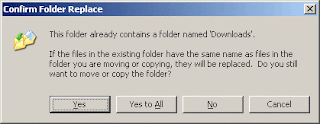
When you want to move 100 filesfrom one location to another without replacing existing files windows XP will show the below option box.
Do you want to press "No" 100 times ?
There is an easy way to solve this problem...
In that option box it's shows "Yes", "Yes to All", "No" and "Cancel".
You want enable "No to All" just hold SHIFT while clicking "No"......

Wednesday, 2 March 2011

Disable delete confirmation dialog box in Windows

1.Right click on the Recyclebin icon
2.Select Properties
3.Uncheck the "Display Delete confirmation dialog"
4.click Ok.

Way to get WindowXP product code from the CD

Explorer your CD then,
Open the Folder I386
and Open the Text file "UNATTEND.TXT" and scroll down
to the last line and there u can find the Microsoft Product key.